
1. Executive Summary
This paper studies a specific but important browser-fingerprinting problem: the same JavaScript file can execute different code paths on mobile and desktop, exposing users to different tracking, fingerprinting, bot-detection, and behavioral-profiling logic depending on platform.
The authors combine static JavaScript analysis with dynamic V8-level execution tracing to identify where execution diverges, what browser/device information caused the branch, and what the platform-exclusive code does. The core contribution is not merely detecting fingerprinting API usage, but tying pre-divergence data sources to post-divergence behavior through a PDG/iFlow pipeline.
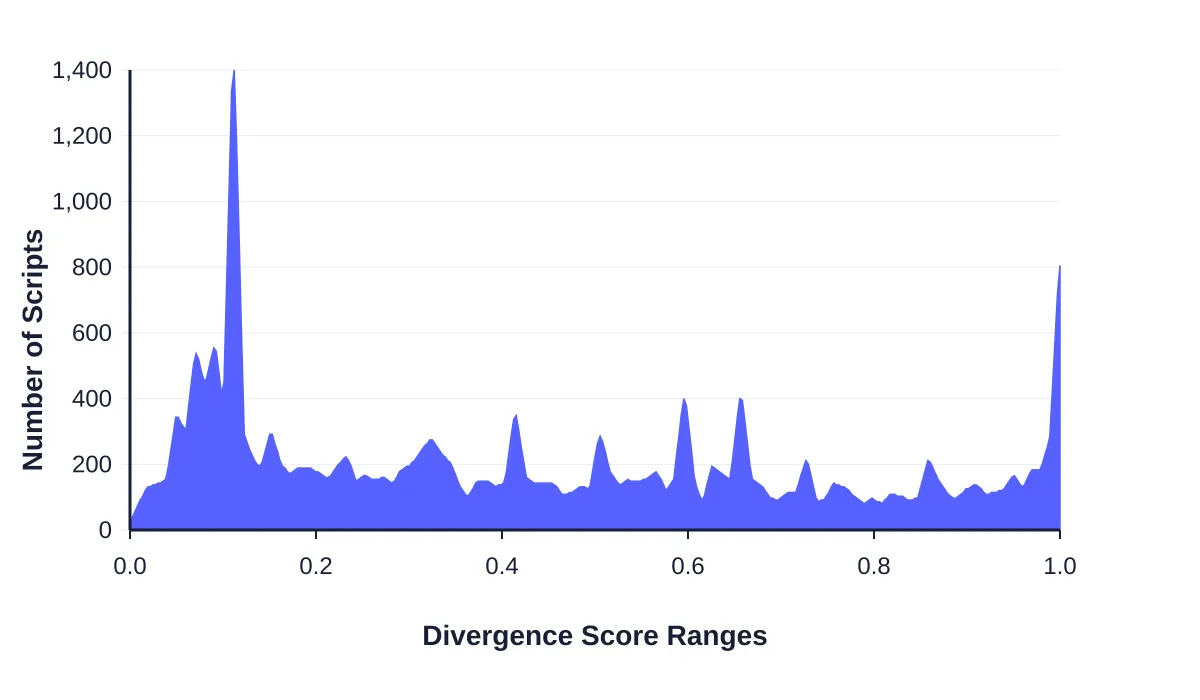
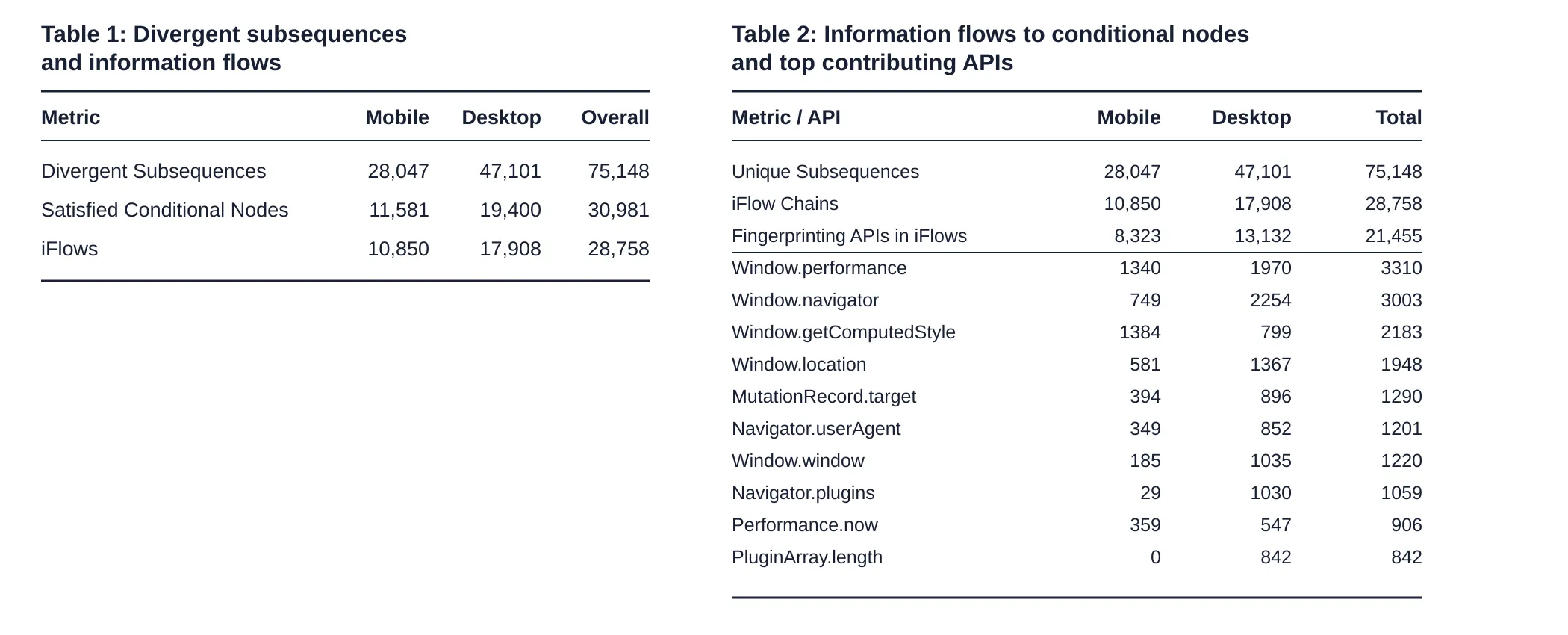
The strongest result is that 20.6% of 109,071 identically sourced JavaScript files from the Tranco top 10K crawl showed mobile/desktop execution divergence. Desktop had 67.9% more divergent execution flows than mobile. The important scope qualifier is that 30,981 of 75,148 divergent subsequences, or about 41%, were tied to explicit satisfied client-side conditionals; the authors then derived 28,758 iFlows from that branch-conditioned subset. Among those iFlows, about 76% referenced known fingerprinting APIs, and another 6% involved lesser-known platform-revealing APIs such as DOM, event, performance, viewport, storage, and media-capability interfaces.
2. Core Research Question
The paper asks: When the same JavaScript is loaded on mobile and desktop, how often does it execute differently, what platform/device signals cause the divergence, and what does the platform-specific code do?
RQ1: Prevalence
How often does identically sourced JavaScript diverge between mobile and desktop execution?
RQ2: Trigger signals
What browser APIs, variables, constants, or information-flow chains feed the conditionals that cause platform-specific execution?
RQ3: Post-divergence behavior
Once execution paths split, are the exclusive code paths doing optimization, tracking, fingerprinting, bot detection, session state tracking, behavioral profiling, or something else?
Why it matters
Platform-specific adaptation can be benign, but the same mechanism can enable device-specific fingerprinting, crawler evasion, bot scoring, or uneven privacy risk.
3. Key Findings
- Divergence is common. The crawl found 109,071 unique JavaScript resources fetched in both mobile and desktop contexts; 22,495 showed non-zero divergence, meaning 20.6% of identically sourced scripts executed differently across platforms.
- Desktop has more divergent execution, but attribution is scoped. The authors identified 75,148 divergent subsequences overall: 47,101 desktop and 28,047 mobile. They linked 30,981 of those to explicit satisfied conditional nodes and derived 28,758 iFlows. That 41% condition-linked share should be read as a lower-bound explanation of explicit client-side branching, not as complete attribution of all divergence.
- Known fingerprinting APIs dominate pre-divergence triggers. Out of 28,758 iFlow chains, 21,455 contained at least one known fingerprinting API.
- The traced branch subset had high source coverage. For conditional nodes associated with divergent subsequences, the paper reports successful information-flow tracing for almost 92.8%; failures are tied to missing JStap edges, timer-driven behavior, and dynamic JavaScript that does not map cleanly back into the static graph.
- Divergence affects common shared scripts, not only obscure code. The most frequent script in the corpus was
https://www.google-analytics.com/analytics.js, observed on 1,309 websites with a reported average divergence score of 15.6%. - Desktop-specific signals include plugin and legacy capability surfaces. Navigator.plugins and PluginArray.length were overwhelmingly desktop-associated in the paper's iFlow table.
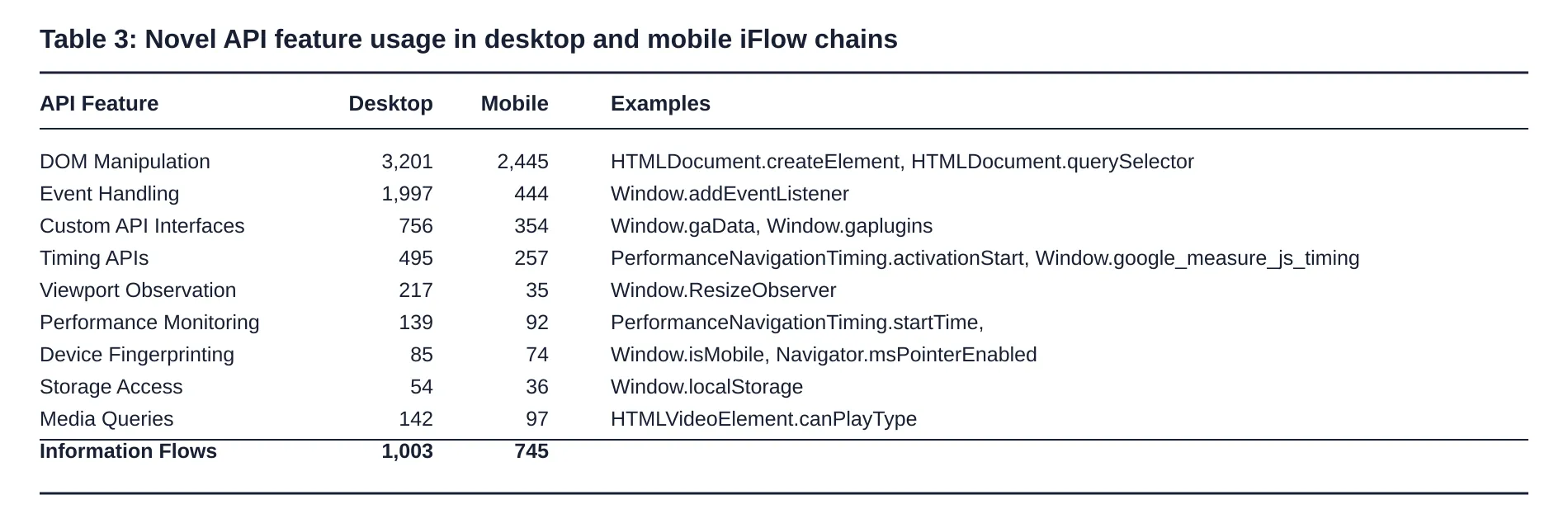
- Lesser-known platform-revealing APIs matter. The authors found 1,748 iFlows involving DOM manipulation, event handling, custom analytics globals, timing APIs, ResizeObserver, storage, navigation timing, and media-capability tests.
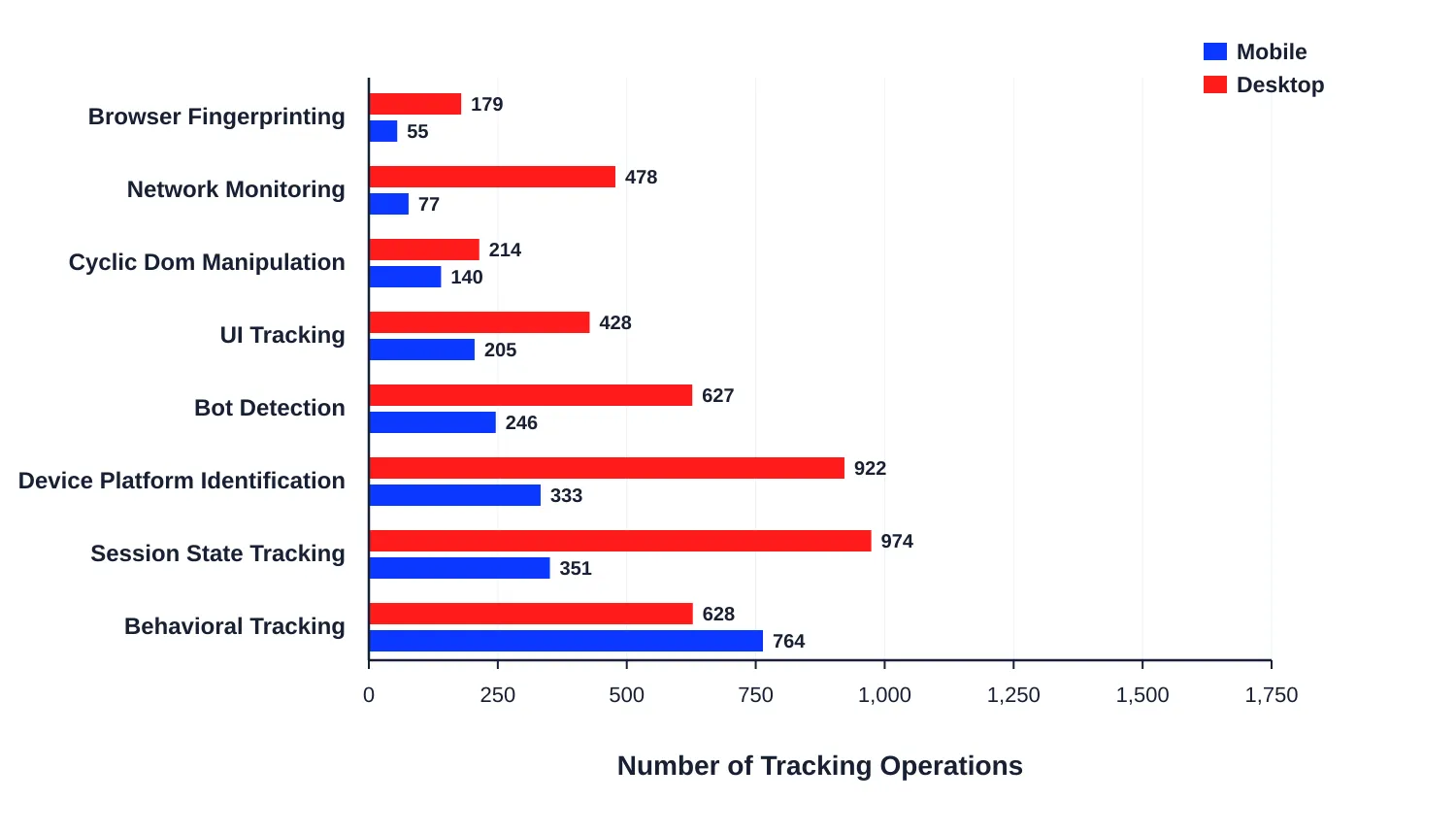
- Post-divergence behavior differs by platform. Desktop-exclusive execution leaned toward browser fingerprinting, bot detection, session state tracking, device/platform identification, and network monitoring. The paper summarizes browser fingerprinting, bot detection, and session-state tracking as 77% desktop-exclusive within those categories, while behavioral tracking was 59% mobile-exclusive.
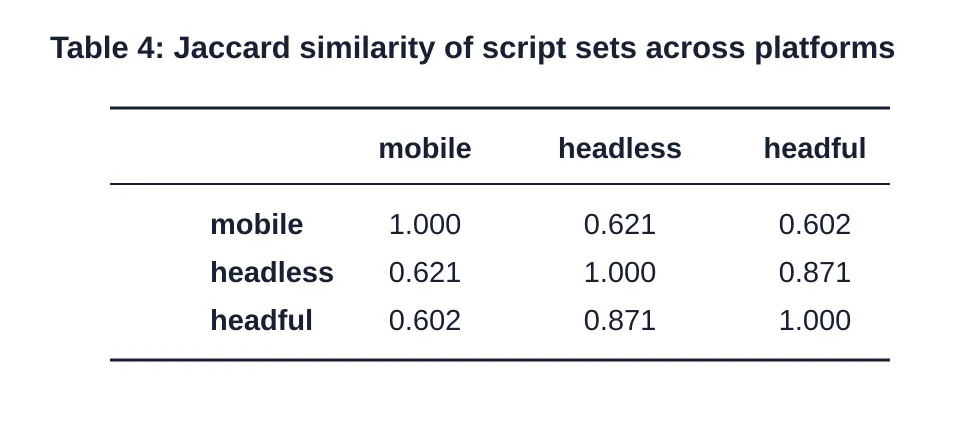
- Headless desktop was closer to headful desktop than to mobile. Jaccard similarity was about 0.871 between headless and headful desktop, but only about 0.60-0.62 between mobile and either desktop mode.
- Temporal stability was tested at the crawl level. Comparing headless-mobile divergence between November 2024 and July 2025, the paper reports no statistically significant difference with p = 0.37.
4. Fingerprinting Signals and Techniques
| Signal / technique | Browser API or mechanism | What it reveals | Identifying value | Stability | Modern relevance | Notes |
|---|---|---|---|---|---|---|
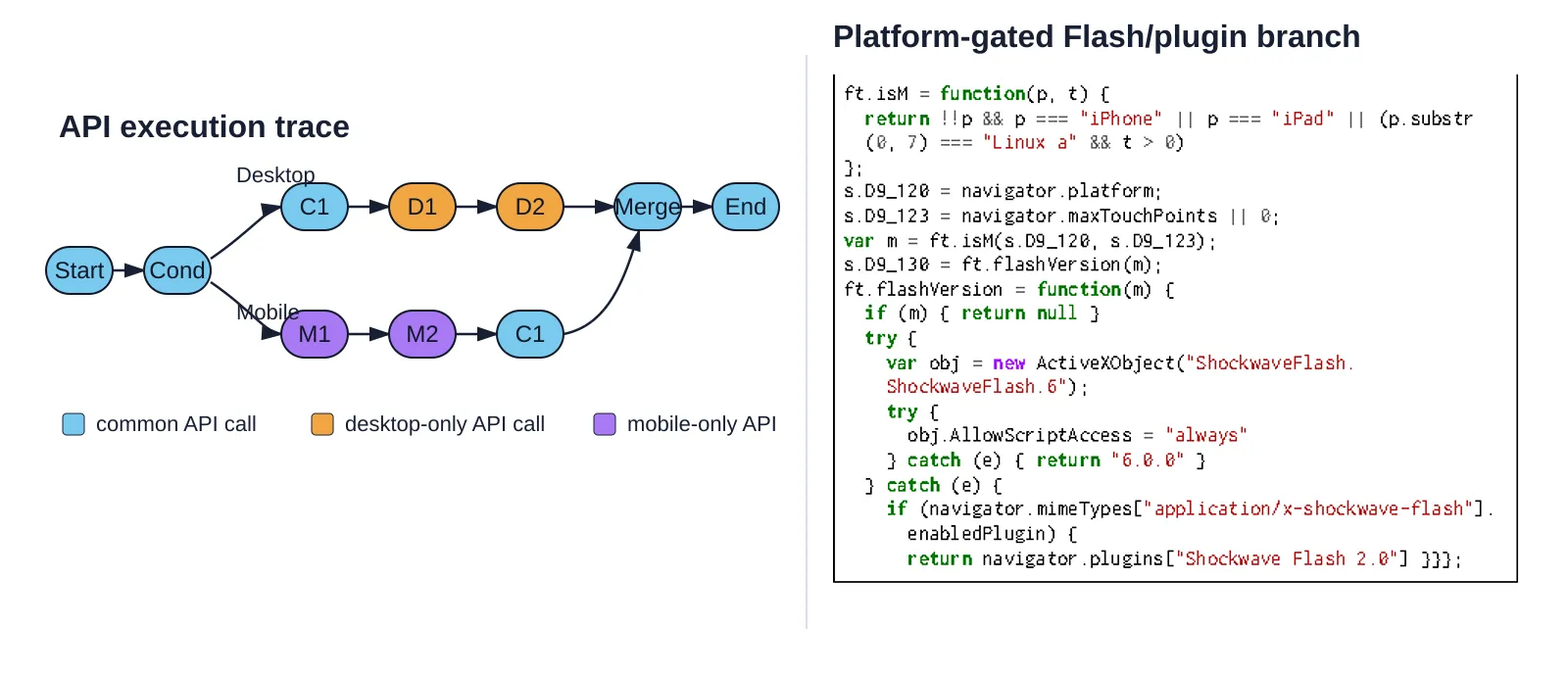
| Platform/touch gate | navigator.platform, navigator.maxTouchPoints | Desktop/mobile or touch-capable classification | Medium | Medium-high | High, retest | Used in Listing 1 to classify mobile and skip Flash/plugin probing. |
| User agent string | navigator.userAgent | Browser, OS, mobile/desktop hints | Medium | Medium | High, but changing | Appears in iFlows and case studies; used for Android Chrome detection. |
| Client Hints | navigator.userAgentData.getHighEntropyValues() | Model, platform version, full browser version list | High | Medium-high | High, retest carefully | Listing 6 fetches high-entropy hints for Android Chrome. |
| Performance timing | Window.performance, Performance.now, navigation timing | Runtime speed, timing, execution environment | Medium | Variable | High | Top iFlow contributor; also used in bot-detection heuristics. |
| Layout/rendering introspection | getComputedStyle, DOM layout | Rendered DOM/layout differences | Medium | Medium | High | Can reveal platform-specific rendering behavior. |
| Plugin surface | navigator.plugins, PluginArray.length, navigator.mimeTypes | Plugin support, legacy desktop capability | High on desktop | Medium | Lower for Flash, still useful as absence/presence signal | Very desktop-skewed; Listing 1 checks Flash-related APIs on desktop path. |
| ActiveX fallback | ActiveXObject | Legacy IE/Windows/Flash capability | High where present | Low in modern web | Mostly outdated | Still important historically in the real-world snippet. |
| Canvas/WebGL profiling | canvas.getContext, WebGL renderer/vendor/extensions | Graphics stack, GPU/driver, headless signals | High | Medium-high | High | Listing 5 uses canvas/WebGL; desktop-exclusive fingerprinting was more pronounced. |
| WebDriver/bot flag | navigator.webdriver | Automation/headless signal | High for bot detection | Variable | High | Listed in the bot-detection case study. |
| Behavioral touch tracking | touchstart, touchmove, TouchEvent.clientX | Gesture behavior, mobile interaction traces | Medium for identity, high for behavior profiling | Session-dependent | High | Mobile-exclusive flows were dominated by behavioral tracking. |
| Mouse/click/scroll tracking | Click, mouse, scroll events | Desktop interaction behavior | Medium | Session-dependent | High | Paper contrasts mobile touch events with desktop click observations. |
| Viewport observation | ResizeObserver, viewport changes | Window size, responsive layout, orientation behavior | Medium | Medium | High | Found among lesser-known platform-revealing APIs. |
| DOM mutation tracking | MutationRecord.target, MutationObserver | UI state, ad-block/layout changes, dynamic DOM | Medium | Variable | High | MutationRecord.target appears in top iFlow APIs. |
| Storage/session state | localStorage, cookies, IndexedDB, database APIs | Persistent or session identifiers | High for linkability | High where storage persists | High | Desktop-exclusive session state tracking was much more common. |
| Network monitoring | Connection speed/type, beacon/background communication | Network environment and communication behavior | Medium | Variable | High | More frequent on desktop-exclusive paths. |
| Media capability probing | HTMLVideoElement.canPlayType, EME APIs | Codec/DRM/platform media support | Medium | Medium | High | Listing 3 and Listing 8 show codec/EME capability checks. |
| Custom analytics globals | Window.gaData, Window.gaplugins, Window.isMobile | Service-specific telemetry/plugin/platform hints | Medium | Service-dependent | High | Categorized as lesser-known platform-revealing interfaces. |
5. Methodology
The paper uses a hybrid static + dynamic analysis pipeline.
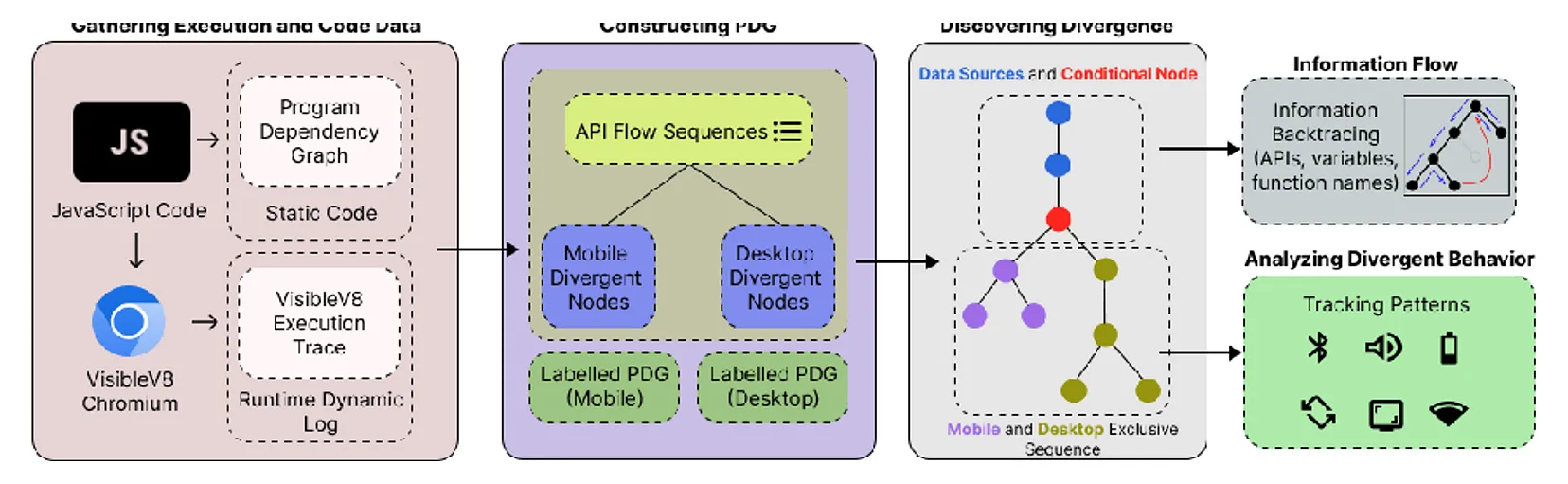
- Execution trace comparison. Execution traces are ordered API calls with character offsets in the JavaScript source. Mobile and desktop traces are compared using a dynamic-programming alignment metric similar to edit distance.
- Static graph construction. JavaScript is parsed into ASTs and PDGs using a modified JStap pipeline. Dynamic VisibleV8 traces annotate PDG nodes to produce platform-specific execution graphs.
- Conditionality analysis. Given a divergent API node, the algorithm walks upward in the PDG to find the closest relevant condition such as an
IfStatement,LogicalExpression, orConditionalExpression. - Information-flow analysis. The sink is the conditional variable or expression. The algorithm backtracks variables, functions, assignments, calls, browser APIs, and constants that influence the condition.
- Crawl design. The crawl used a Google Pixel 4a for mobile and an Ubuntu 24.04 desktop machine. Both used Chromium 128. Crawling was automated with Puppeteer; the desktop crawl used headless Chromium with VisibleV8 and a stealth plugin.
- Real-device mobile tracing. Mobile tracing was not only an emulation comparison: the authors ported VisibleV8 to Android to handle Android sandbox logging restrictions and contributed the mobile-specific patch upstream. This matters because the measurement depends on runtime traces from a real Pixel 4a.
- Dataset. The authors crawled the top 10K Tranco sites, successfully gathering traces from 7,811 sites on both platforms, and identified 109,071 unique JavaScript resources fetched in both contexts.
6. Interpreting the Metrics
7. Browser Probe Examples
Each example is a self-contained browser JavaScript snippet for inspecting the signal families discussed in the paper. Direct paper code is distinguished from reconstructed, inferred, or adapted examples.
Trace divergence score Reconstructed from pseudocode
(async () => {
  const mobileTrace = [
    { offset: 0, api: "Start" },
    { offset: 10, api: "Cond" },
    { offset: 30, api: "M1" },
    { offset: 40, api: "M2" },
    { offset: 20, api: "C1" },
    { offset: 50, api: "Merge" },
    { offset: 60, api: "End" }
  ];

  const desktopTrace = [
    { offset: 0, api: "Start" },
    { offset: 10, api: "Cond" },
    { offset: 20, api: "C1" },
    { offset: 35, api: "D1" },
    { offset: 45, api: "D2" },
    { offset: 50, api: "Merge" },
    { offset: 60, api: "End" }
  ];

  function divergenceScore(Fm, Fd, { gap = 1, penalty = 0.5, lookahead = 5 } = {}) {
    const n = Fm.length, m = Fd.length;
    const same = (a, b) => a && b && a.offset === b.offset && a.api === b.api;
    const D = Array.from({ length: n + 1 }, () => Array(m + 1).fill(Infinity));

    D[0][0] = 0;
    for (let i = 1; i <= n; i++) D[i][0] = i * gap;
    for (let j = 1; j <= m; j++) D[0][j] = j * gap;

    for (let i = 1; i <= n; i++) {
  for (let j = 1; j <= m; j++) {
    D[i][j] = Math.min(D[i - 1][j] + gap, D[i][j - 1] + gap);

    if (same(Fm[i - 1], Fd[j - 1])) {
      D[i][j] = Math.min(D[i][j], D[i - 1][j - 1]);
    } else {
      const lo = Math.max(1, j - lookahead);
      const hi = Math.min(m, j + lookahead);
      for (let jp = lo; jp <= hi; jp++) {
        if (same(Fm[i - 1], Fd[jp - 1])) {
          D[i][j] = Math.min(D[i][j], D[i - 1][jp - 1] + penalty);
        }
      }
    }
  }
    }

    return {
  rawCost: D[n][m],
  normalized: D[n][m] / Math.max(n, m),
  parameters: { gap, penalty, lookahead }
    };
  }

  const result = {
    sourceType: "reconstructed from paper algorithm",
    mobileTrace,
    desktopTrace,
    divergence: divergenceScore(mobileTrace, desktopTrace)
  };

  console.log(result);
  return result;
})()
Platform-gated Flash/plugin probing Adapted from Listing 1
(async () => {
  const errors = [];
  const platform = navigator.platform || "";
  const maxTouchPoints = navigator.maxTouchPoints || 0;

  function isMobileLike(p, t) {
    return !!p && (
  p === "iPhone" ||
  p === "iPad" ||
  (typeof p.substr === "function" && p.substr(0, 7) === "Linux a" && t > 0)
    );
  }

  const mobileLike = isMobileLike(platform, maxTouchPoints);
  const flash = {
    skippedBecauseMobileLike: mobileLike,
    activeXAvailable: false,
    mimeTypeEnabled: null,
    pluginPresent: null
  };

  if (!mobileLike) {
    try {
  flash.activeXAvailable = "ActiveXObject" in window;
    } catch (e) {
  errors.push(`ActiveX check failed: ${e.message}`);
    }

    try {
  const mt = navigator.mimeTypes && navigator.mimeTypes["application/x-shockwave-flash"];
  flash.mimeTypeEnabled = !!(mt && mt.enabledPlugin);
    } catch (e) {
  errors.push(`mimeTypes check failed: ${e.message}`);
    }

    try {
  flash.pluginPresent = !!(
    navigator.plugins &&
    (navigator.plugins["Shockwave Flash"] || navigator.plugins["Shockwave Flash 2.0"])
  );
    } catch (e) {
  errors.push(`plugins check failed: ${e.message}`);
    }
  }

  const result = {
    sourceType: "modernized from Listing 1",
    platform,
    maxTouchPoints,
    mobileLike,
    flash,
    errors
  };

  console.log(result);
  return result;
})()
Touch and coarse-pointer capability detection Adapted from Listings 2 and 9
(async () => {
  const result = {
    sourceType: "direct/conceptual from touch-detection listings",
    maxTouchPoints: navigator.maxTouchPoints ?? null,
    msMaxTouchPoints: navigator.msMaxTouchPoints ?? null,
    ontouchstartInWindow: "ontouchstart" in window,
    anyPointerCoarse: null,
    pointerCoarse: null,
    observedTouchStartDuringProbe: false,
    inferredTouchCapable: false,
    errors: []
  };

  try {
    result.anyPointerCoarse = matchMedia("(any-pointer: coarse)").matches;
    result.pointerCoarse = matchMedia("(pointer: coarse)").matches;
  } catch (e) {
    result.errors.push(`matchMedia failed: ${e.message}`);
  }

  const handler = () => { result.observedTouchStartDuringProbe = true; };
  try {
    window.addEventListener("touchstart", handler, { once: true, passive: true });
    await new Promise(resolve => setTimeout(resolve, 500));
    window.removeEventListener("touchstart", handler);
  } catch (e) {
    result.errors.push(`touch listener failed: ${e.message}`);
  }

  result.inferredTouchCapable = !!(
    result.maxTouchPoints ||
    result.msMaxTouchPoints ||
    result.ontouchstartInWindow ||
    result.anyPointerCoarse
  );

  console.log(result);
  return result;
})()
Media codec capability heuristic Adapted from Listing 3
(async () => {
  const result = {
    sourceType: "modernized from Listing 3",
    canPlayTypeAvailable: false,
    codecs: {},
    paperAndroidHeuristic: null,
    errors: []
  };

  try {
    const video = document.createElement("video");
    result.canPlayTypeAvailable = typeof video.canPlayType === "function";
    result.codecs.vp9Webm = video.canPlayType('video/webm; codecs="vp9"');
    result.codecs.hvc1Mp4 = video.canPlayType('video/mp4; codecs="hvc1"');
    result.paperAndroidHeuristic =
  result.codecs.vp9Webm === "probably" &&
  result.codecs.hvc1Mp4 !== "probably";
  } catch (e) {
    result.errors.push(e.message);
  }

  console.log(result);
  return result;
})()
Canvas/WebGL/browser profiling and bot signal collection Adapted from Listing 5
(async () => {
  const result = {
    sourceType: "modernized from Listing 5",
    canvas2D: false,
    webgl: {
  supported: false,
  experimentalSupported: false,
  vendor: null,
  renderer: null,
  unmaskedVendor: null,
  unmaskedRenderer: null,
  extensionCount: null
    },
    browserInfo: {
  appName: navigator.appName,
  appVersion: navigator.appVersion,
  product: navigator.product,
  webdriver: navigator.webdriver,
  userAgent: navigator.userAgent
    },
    screenInfo: {
  colorDepth: screen.colorDepth,
  pixelDepth: screen.pixelDepth,
  width: screen.width,
  height: screen.height,
  devicePixelRatio: window.devicePixelRatio
    },
    errors: []
  };

  try {
    const canvas = document.createElement("canvas");
    result.canvas2D = !!canvas.getContext("2d");

    const gl =
  canvas.getContext("webgl") ||
  canvas.getContext("experimental-webgl");

    result.webgl.supported = !!canvas.getContext("webgl");
    result.webgl.experimentalSupported = !!canvas.getContext("experimental-webgl");

    if (gl) {
  result.webgl.vendor = gl.getParameter(gl.VENDOR);
  result.webgl.renderer = gl.getParameter(gl.RENDERER);
  result.webgl.extensionCount = (gl.getSupportedExtensions() || []).length;

  const dbg = gl.getExtension("WEBGL_debug_renderer_info");
  if (dbg) {
    result.webgl.unmaskedVendor = gl.getParameter(dbg.UNMASKED_VENDOR_WEBGL);
    result.webgl.unmaskedRenderer = gl.getParameter(dbg.UNMASKED_RENDERER_WEBGL);
  }
    }
  } catch (e) {
    result.errors.push(e.message);
  }

  console.log(result);
  return result;
})()
Android Chrome Client Hints high-entropy fetch Adapted from Listing 6
(async () => {
  const result = {
    sourceType: "modernized from Listing 6",
    userAgent: navigator.userAgent,
    hasUserAgentData: !!navigator.userAgentData,
    isAndroidChromeByUA: /Chrome/i.test(navigator.userAgent) && /Android/i.test(navigator.userAgent),
    requestedHints: ["model", "platformVersion", "fullVersionList"],
    highEntropyValues: null,
    skippedReason: null,
    errors: []
  };

  try {
    if (!result.hasUserAgentData) {
  result.skippedReason = "navigator.userAgentData is unavailable";
    } else if (!result.isAndroidChromeByUA) {
  result.skippedReason = "UA check did not match Android Chrome";
    } else if (typeof navigator.userAgentData.getHighEntropyValues !== "function") {
  result.skippedReason = "getHighEntropyValues is unavailable";
    } else {
  result.highEntropyValues =
    await navigator.userAgentData.getHighEntropyValues(result.requestedHints);
    }
  } catch (e) {
    result.errors.push(e.message);
  }

  console.log(result);
  return result;
})()
Encrypted Media Extension capability surface Adapted from Listing 8
(async () => {
  const result = {
    sourceType: "modernized from Listing 8",
    apiPresence: {
  requestMediaKeySystemAccess: !!navigator.requestMediaKeySystemAccess,
  MSMediaKeys: !!window.MSMediaKeys,
  WebKitMediaKeys: !!window.WebKitMediaKeys
    },
    keySystemsNamedInPaper: {
  "com.widevine.alpha": "Widevine",
  "com.microsoft.playready": "PlayReady",
  "com.apple.fps": "FairPlay"
    },
    anyEmeApiPresent: false
  };

  result.anyEmeApiPresent = Object.values(result.apiPresence).some(Boolean);

  console.log(result);
  return result;
})()
Short-lived touch behavioral probe Adapted from Listings 4 and 7
(async () => {
  const result = {
    sourceType: "modernized from Listings 4 and 7",
    durationMs: 2000,
    touchstartCount: 0,
    touchmoveCount: 0,
    samples: [],
    errors: []
  };

  const target = document.documentElement || window;

  function sampleTouch(e, type) {
    const t = e.touches && e.touches[0];
    if (result.samples.length < 5) {
  result.samples.push({
    type,
    time: Math.round(performance.now()),
    clientX: t ? t.clientX : null,
    clientY: t ? t.clientY : null,
    touchCount: e.touches ? e.touches.length : 0
  });
    }
  }

  const onStart = e => {
    result.touchstartCount++;
    sampleTouch(e, "touchstart");
  };

  const onMove = e => {
    result.touchmoveCount++;
    sampleTouch(e, "touchmove");
  };

  try {
    target.addEventListener("touchstart", onStart, { passive: true });
    target.addEventListener("touchmove", onMove, { passive: true });
    await new Promise(resolve => setTimeout(resolve, result.durationMs));
    target.removeEventListener("touchstart", onStart);
    target.removeEventListener("touchmove", onMove);
  } catch (e) {
    result.errors.push(e.message);
  }

  console.log(result);
  return result;
})()
Lesser-known platform-revealing surface probe Inferred from Table 3
(async () => {
  const result = {
    sourceType: "inferred/modernized from Table 3",
    dom: {},
    style: {},
    mutation: {},
    storage: {},
    performance: {},
    viewport: {},
    media: {},
    errors: []
  };

  try {
    const el = document.createElement("div");
    el.textContent = "probe";
    el.style.cssText = "position:absolute;left:-9999px;width:10px;height:10px;";
    document.body.appendChild(el);

    result.dom.createElement = true;
    result.dom.querySelectorBody = !!document.querySelector("body");
    result.style.computedWidth = getComputedStyle(el).width;

    if ("MutationObserver" in window) {
  const seenTargets = [];
  const mo = new MutationObserver(records => {
    for (const r of records) seenTargets.push(r.target.nodeName);
  });
  mo.observe(document.body, { childList: true });
  const child = document.createElement("span");
  document.body.appendChild(child);
  document.body.removeChild(child);
  await new Promise(resolve => setTimeout(resolve, 0));
  mo.disconnect();
  result.mutation.targets = seenTargets;
    }

    el.remove();
  } catch (e) {
    result.errors.push(`DOM/style/mutation probe failed: ${e.message}`);
  }

  try {
    const key = "__platform_probe__";
    localStorage.setItem(key, "1");
    result.storage.localStorageRoundTrip = localStorage.getItem(key) === "1";
    localStorage.removeItem(key);
  } catch (e) {
    result.storage.localStorageRoundTrip = false;
    result.errors.push(`localStorage probe failed: ${e.message}`);
  }

  try {
    result.performance.now = performance.now();
    const nav = performance.getEntriesByType &&
  performance.getEntriesByType("navigation")[0];
    result.performance.navigationStartTime = nav ? nav.startTime : null;
    result.performance.activationStart = nav ? nav.activationStart : null;
  } catch (e) {
    result.errors.push(`performance probe failed: ${e.message}`);
  }

  result.viewport.resizeObserverAvailable = "ResizeObserver" in window;
  result.viewport.innerWidth = window.innerWidth;
  result.viewport.innerHeight = window.innerHeight;

  try {
    const video = document.createElement("video");
    result.media.h264 = video.canPlayType('video/mp4; codecs="avc1.42E01E"');
    result.media.vp9 = video.canPlayType('video/webm; codecs="vp9"');
  } catch (e) {
    result.errors.push(`media probe failed: ${e.message}`);
  }

  console.log(result);
  return result;
})()
Static data-flow dependency example Adapted from Listing 10
(async () => {
  let a = 1;
  let b = 0;

  const before = { a, b };
  const expressionInputs = { previousB: b, a, constant: 2 };

  b = b + a + 2;

  const result = {
    sourceType: "direct/minimal from Listing 10",
    before,
    expressionInputs,
    after: { a, b },
    dependencyExplanation: "The new value of b depends on previous b, a, and constant 2."
  };

  console.log(result);
  return result;
})()
8. Practical Security Research Takeaways
- Browser fingerprinting research. Differential, cross-platform measurement matters. A detector that only searches for known APIs may miss the conditional structure around when those APIs execute.
- Bot detection research. Desktop-exclusive flows contained more bot-detection logic, including WebDriver, performance timing, canvas/WebGL behavior, and environment profiling.
- Browser automation. Headless desktop automation can approximate desktop headful script loading and control flow better than it approximates mobile. Mobile-specific behavior needs a real or high-fidelity mobile environment.
- Privacy defenses. Defenses should test whether reducing or spoofing platform signals changes execution paths, not merely whether individual values are reduced.
- Anti-fingerprinting evaluation. A strong evaluation should compare normal browser vs privacy mode; mobile vs desktop; headless vs headful; spoofed vs real platform signals; and pre/post branch behavior.
- Identity consistency testing. UA spoofing without coherent touch, media codecs, plugins, screen, and Client Hints can push scripts into inconsistent branches.
- Attribution boundary. Treat iFlow source tracing as a strong explanation for explicit client-side branches, while still testing unexplained divergence caused by asynchronous callbacks, server-side variation, or network-dependent behavior.
9. Limitations and Gaps
- Chromium/V8 scope. The system is based on Chromium and VisibleV8; it does not directly cover Firefox/Gecko or Safari/WebKit behavior.
- Single mobile device model. The mobile environment is a Google Pixel 4a, which does not capture iOS Safari, Android WebView diversity, tablets, or vendor-customized browsers.
- Desktop crawl used headless automation. The authors validate headless against headful, but headless still may miss real-user behavior or trigger automation-specific paths.
- Static iFlow can miss dependencies. JStap may miss data-flow edges and struggles with eval, higher-order functions, runtime code generation, and dynamic JavaScript.
- VisibleV8 logging scope is not complete for every operation. It logs WebIDL-defined APIs but not JavaScript built-ins such as Math.round() or user-defined functions not attached to globals.
- No implicit-flow tracking. The iFlow analysis captures explicit influence, but not implicit flows.
- Grouped conditions can over-attribute. When several conditions appear together, the algorithm may flag multiple sources even if only one was decisive.
- No direct user-level uniqueness measurement. The paper measures divergent execution and API categories, not how uniquely resulting fingerprints identify users/devices across a population.
- Tracking intent is not always proven. Platform-specific divergence can be benign. The paper shows privacy-relevant asymmetry, not malicious intent for every script.
10. Retesting Plan
Browsers and platforms
Test current stable and beta Chromium-family browsers, Firefox, Safari/WebKit, iOS Safari, Android Chrome, Android WebView, privacy-focused browsers, and anti-fingerprinting modes.
Signals to collect
Re-test navigator, UA, Client Hints, screen, touch/pointer queries, plugins, WebGL/canvas/audio, performance timing, layout/style, DOM mutation, storage, cookies, networking, media codecs, EME, analytics globals, and webdriver.
Sample design
Use synchronized repeated crawls over a large site list. Control network vantage point, profile state, consent banners, cache state, timing, and first-party/third-party script context.
Stability tests
Repeat across restarts, fresh profiles, stateful profiles, days/weeks, OS updates, browser updates, and different interaction modes.
Entropy and uniqueness checks
Add a consenting panel or lab population to compute per-signal entropy, collisions, linkability, and stability.
Automation vs real-user comparisons
Compare headless, headful, WebDriver, Playwright/Puppeteer, manual browsing, and realistic interaction replay.
Privacy-mode comparisons
Test normal mode, private mode, strict privacy settings, randomized APIs, reduced Client Hints, and spoofed platform profiles.
Key evaluation question
Do defenses merely change exposed values, or do they also change which branches execute?
11. Assessment
This is a valuable paper for browser fingerprinting and anti-bot researchers because it studies branch-conditioned behavior, not just API usage. Its main insight is operationally important: the same script may fingerprint, track, or profile differently depending on platform, and the branch trigger can often be traced to identifiable browser/device signals.
The most durable contribution is the hybrid method: combine V8-level dynamic traces with AST/PDG-based static analysis, identify the first divergent API, trace the nearest controlling condition, backtrack the information sources, then classify the exclusive post-divergence behavior.
The findings should be treated cautiously where they depend on Chromium 128, one Android device model, headless desktop crawling, JStap precision, and the web snapshot from the crawl period. The paper does not prove user-level uniqueness or malicious tracking intent. Still, it provides strong evidence that platform-specific JavaScript divergence is widespread, privacy-relevant, and measurable with high-fidelity instrumentation.