
1. Executive Summary
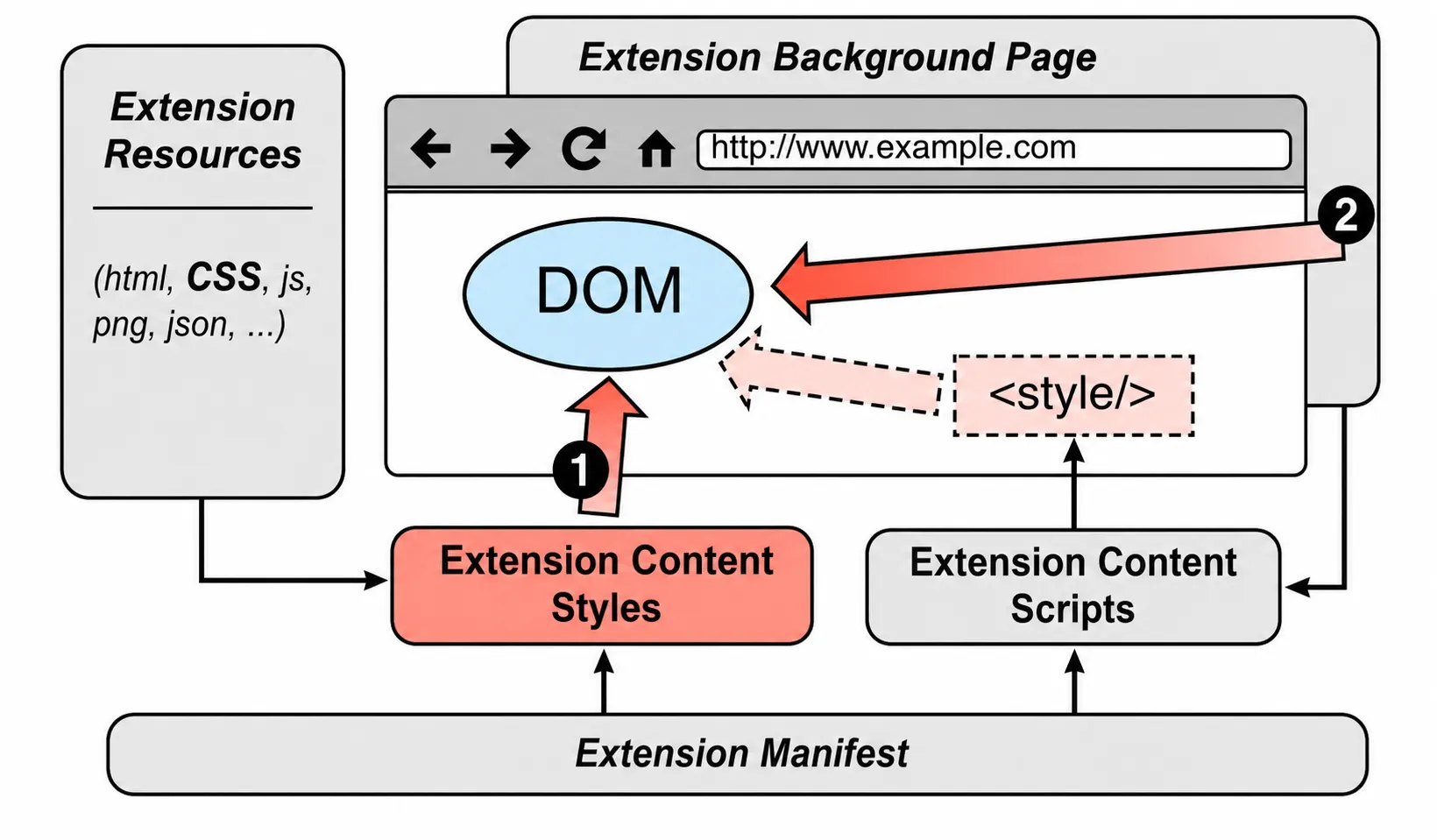
This paper identifies a browser-extension fingerprinting channel that does not need web-accessible extension resources, privileged APIs, or visible DOM artifacts. A page can create hidden DOM triggers that match extension-injected CSS selectors and then compare computed styles or layout dimensions against baseline elements.
The authors collected 116,485 Chrome Web Store extensions in April 2019 and found 6,645 extensions that could inject CSS on any domain. Their pipeline generated and confirmed trigger elements, removed collisions, and reported 4,446 uniquely identifiable extensions, or 3.8% of the measured corpus.
2. Attack Surface
Browser implementations hide extension-injected style sheets from document.styleSheets, but the resulting styles still change page elements. The attack page supplies matching selectors, hides the elements off-screen, and reads the result through standard APIs such as getComputedStyle, getBoundingClientRect, offsetWidth, and offsetHeight.
Declarative styles
Extensions can list CSS files in manifest.json content scripts. Broad match patterns make those styles available on arbitrary pages.
Dynamic styles
Extensions can also call chrome.tabs.insertCSS; the authors used Mystique to observe those programmatic injections.
Trigger elements
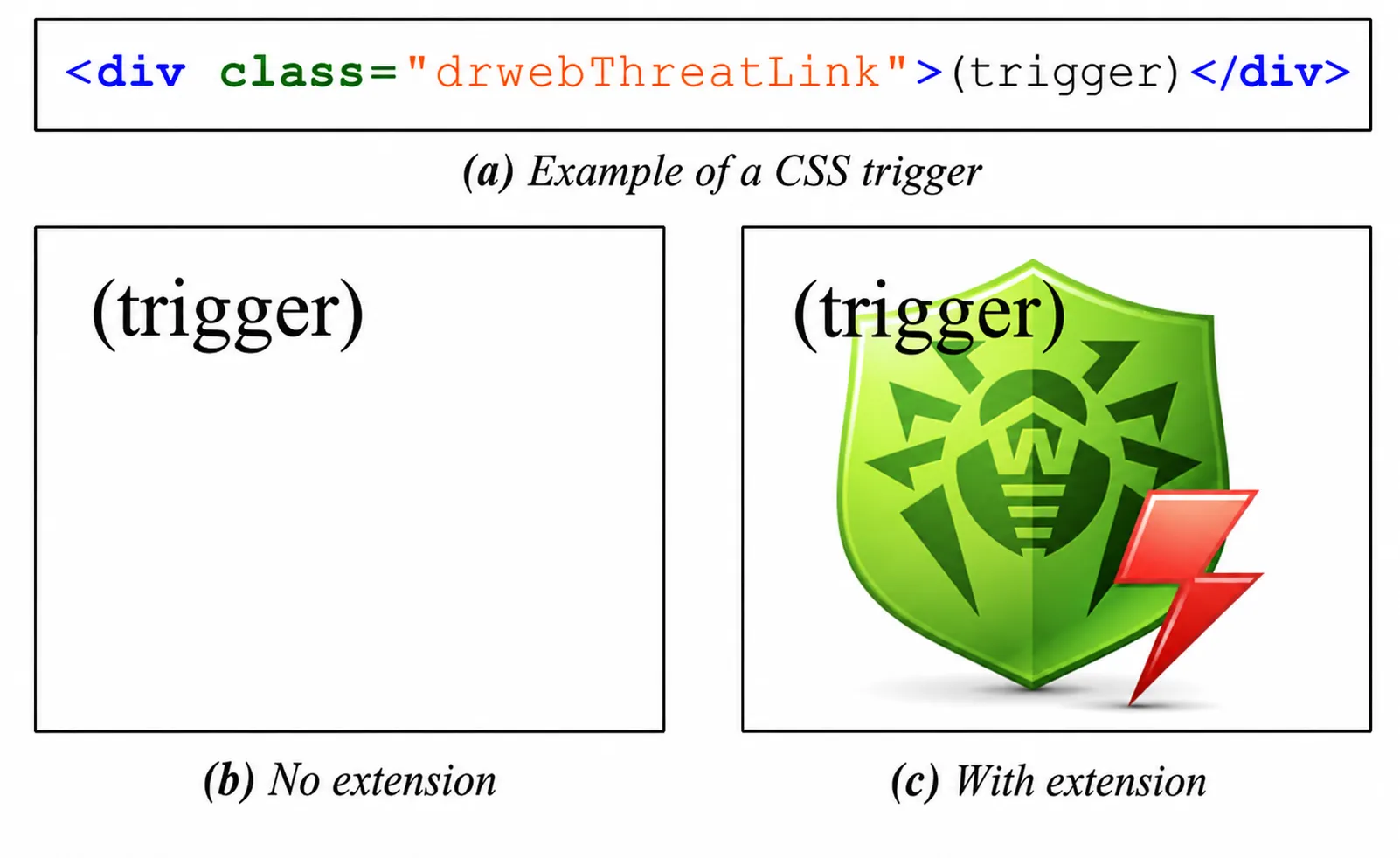
The test page translates selectors into hidden DOM structures with matching IDs, classes, and hierarchy.
Observable side effects
The page compares baseline and trigger elements, then treats changed style properties or dimensions as extension evidence.
3. Method
The large-scale evaluation focuses on extensions whose CSS can apply on any domain, because any visited site could host the corresponding triggers. The paper also distinguishes that universal case from extensions that inject CSS only on specific sites such as Gmail, Twitter, or YouTube.
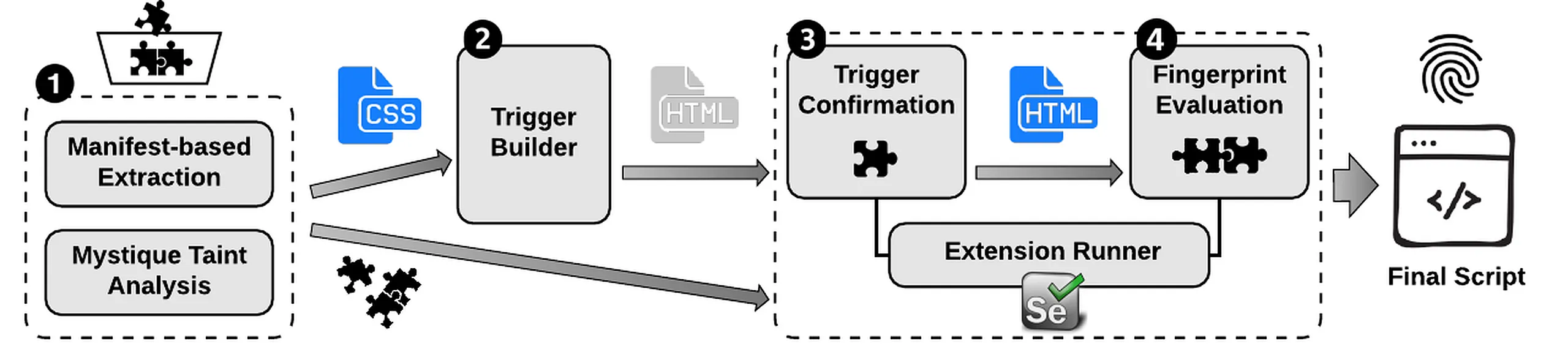
| Stage | Paper method | Review significance |
|---|---|---|
| Collect extensions | Custom Chrome Web Store crawler collected 116,485 extensions in April 2019 after excluding themes and apps. | The headline rates are historical Chrome Web Store measurements, not current ecosystem rates. |
| Extract CSS | Parse declarative content_scripts CSS and use Mystique to observe dynamic tabs.insertCSS injection. | The technique is limited to extensions that inject CSS visible to page layout and style APIs. |
| Generate triggers | Translate selectors into decoy DOM structures; skip pseudo-classes and pseudo-elements that require interaction or are hard to trigger in the background. | The trigger database is intentionally biased toward background fingerprinting that can run without user gestures. |
| Confirm dynamically | Run extensions against generated test pages with Selenium, compare trigger elements to baseline elements, and repeat collection three times. | Repeated confirmation filters nondeterministic style changes before uniqueness analysis. |
| Check uniqueness | Expose extensions to confirmed triggers, compare style and dimension signatures, and remove triggers that collide across extensions. | The final count is about uniquely identifiable extensions, not merely extensions that affect CSS. |
4. Fingerprintability Results
Table 2 is the core evidence for the paper's prevalence claim. It narrows the measured corpus from CSS-injecting extensions to confirmed triggers and then to uniquely identifiable extensions.
tabs.insertCSS use; 35 were already in the declarative set.
The final 4,446 extensions are identifiable on any webpage under the authors' model because their styles can apply globally. That number should not be generalized to all extensions or to the current Chrome Web Store without rerunning the measurement.
5. Strategies and Collisions
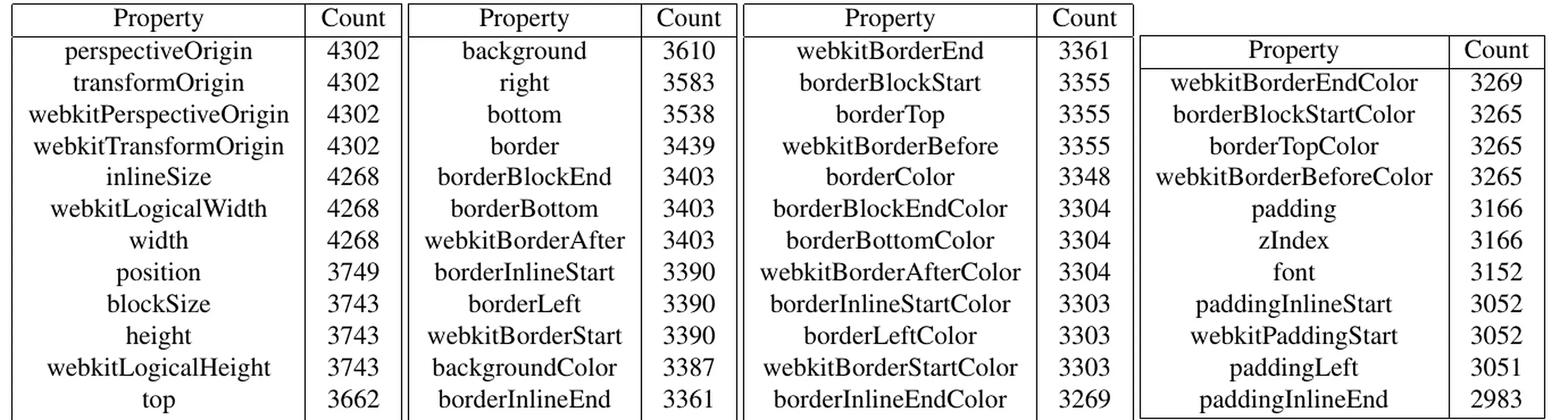
The paper evaluates progressively richer fingerprinting strategies. A unique trigger alone identifies 3,866 extensions. Including changed style properties identifies 4,090. Including both changed properties and their values, across computed-style and dimension APIs, identifies 4,446.

- Direct uniqueness. 3,475 of the 4,446 identifiable extensions had at least one trigger not shared with any other extension.
- Property/value uniqueness. Another 846 extensions shared all triggers but became unique after considering changed properties and values.
- Combination uniqueness. The remaining 125 were identifiable through a unique combination of non-unique trigger effects.
- Collision context. The authors found 218 collision clusters among non-unique fingerprints; most were small and often reflected duplicated extensions, variants from the same developer, copies, or shared libraries.
- Dimension sensitivity. Dimension-based fingerprints may vary with screen size and device conditions, so those signatures need careful database and replay handling.
6. Overlap and Stability
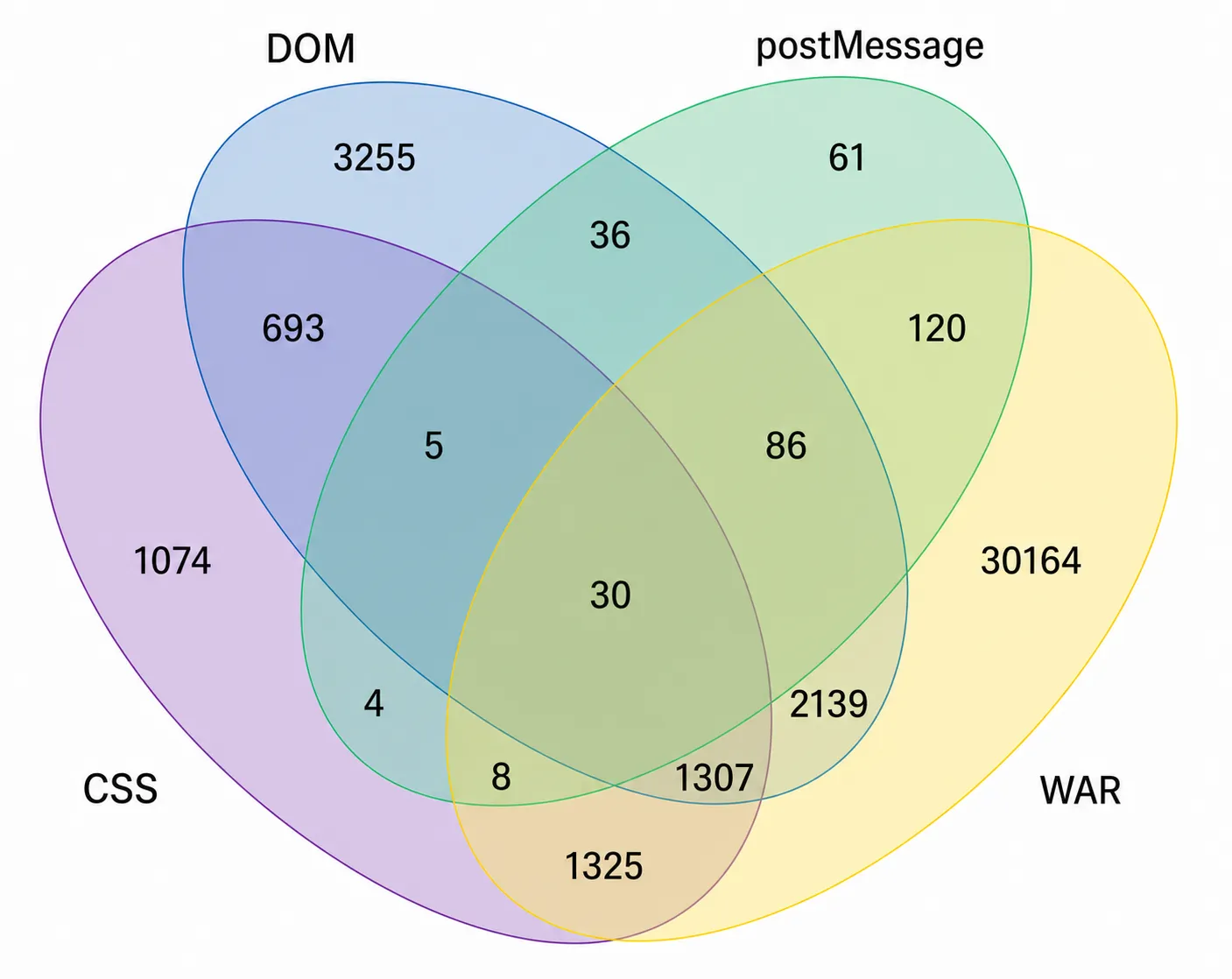
CSS fingerprinting overlaps only partly with prior extension-fingerprinting techniques. Compared against web-accessible resources, DOM modification, and postMessage methods, the paper reports 1,074 CSS-only extensions. It also notes that if web-accessible resource probing disappeared through UUID randomization similar to Firefox's design, CSS would become the only compared method for an additional 1,325 extensions.
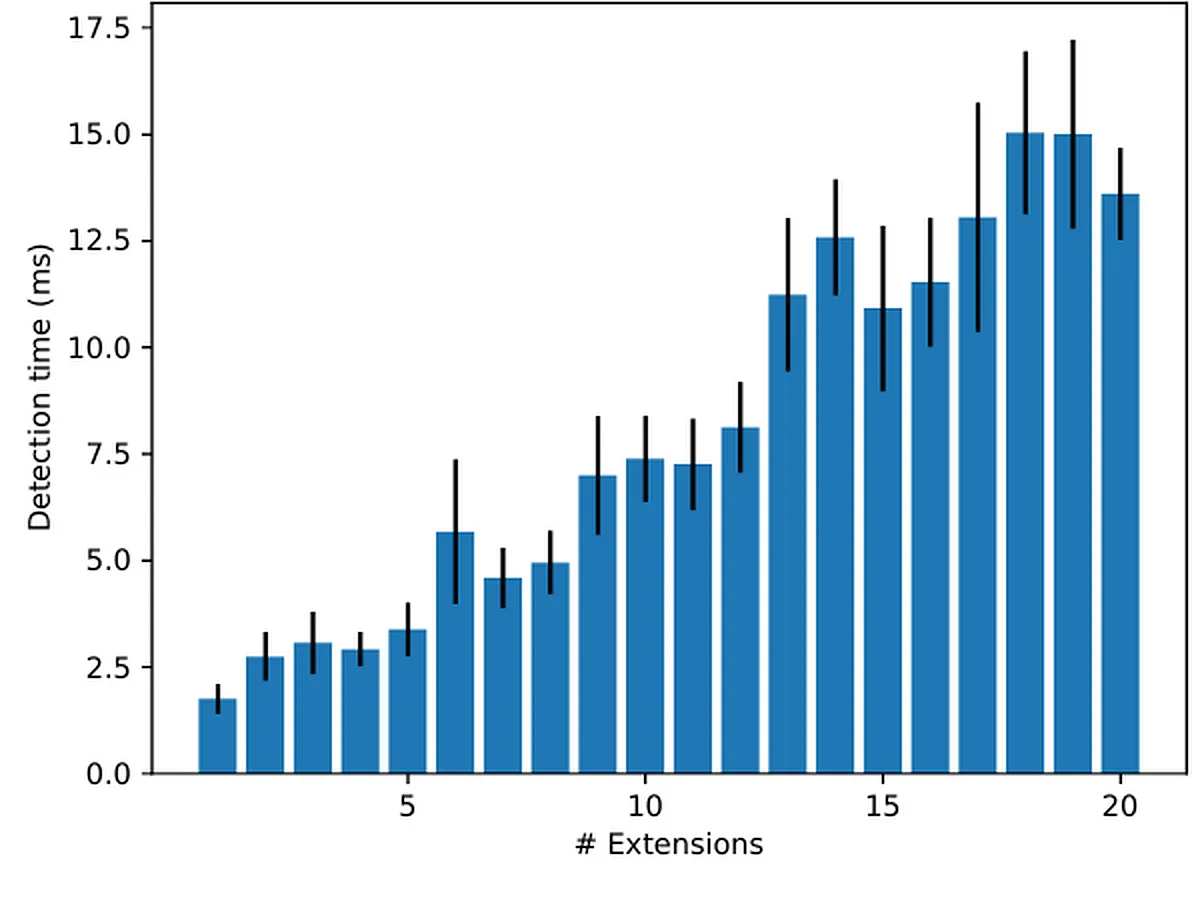
The proof-of-concept benchmark used random subsets of 1 to 20 installed extensions and ran at window.onload. The reported detection time was around 15 ms even for 20 installed extensions on the authors' laptop setup.
For longitudinal context, the authors also collected 501,349 extension versions from mid-2014 to mid-2019, reduced to 426,807 after excluding themes and apps. In a June 2020 retest, 940 of the 4,446 universally fingerprintable extensions had updated; 776 of those 940 still triggered at least one previously discovered trigger.
7. Countermeasures
The paper rejects removing getComputedStyle as a practical mitigation because the authors observed broad legitimate use: 61,414 unique scripts using the API across 76,638 of the Alexa top 100K sites in their VisibleV8 crawl. Their manual review did not find evidence that this exact extension-fingerprinting technique was already being used in the sampled scripts.
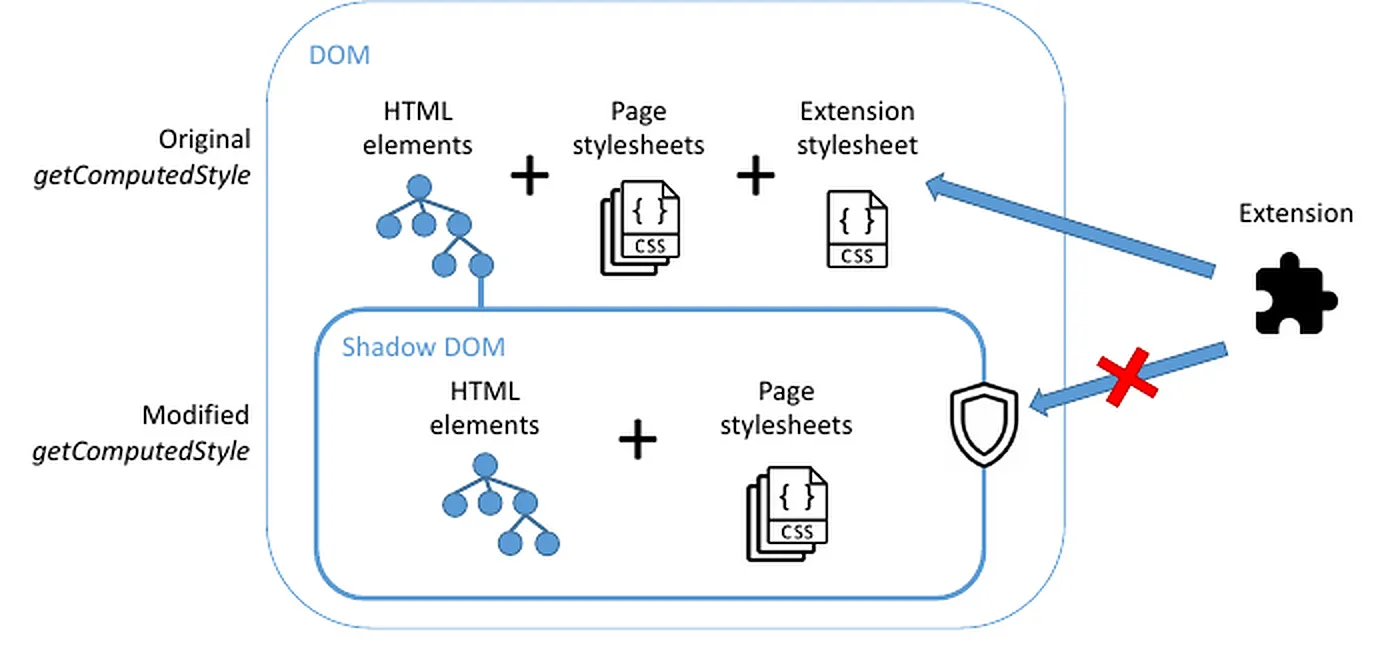
The proposed prototype defense uses a Shadow DOM mirror. Page styles are copied into the mirror, extension-origin content styles are excluded, and selected getComputedStyle calls are rerouted to corresponding mirror elements.
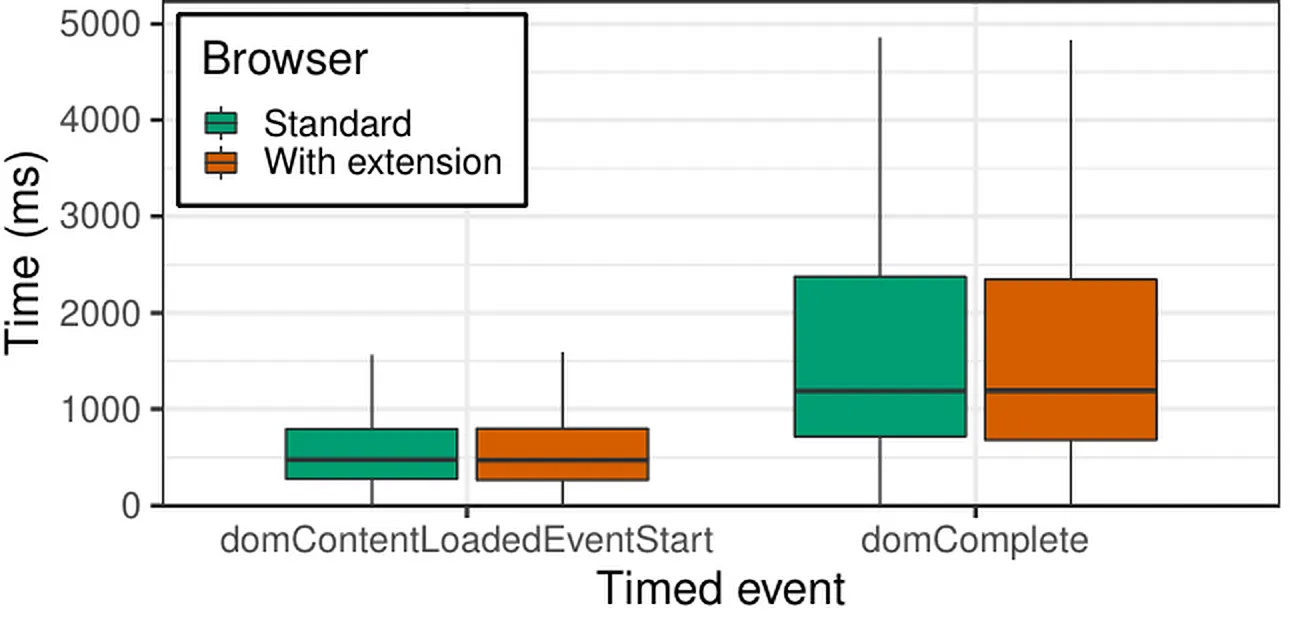
- Prototype scope. The defense is a browser extension prototype evaluated on the Tranco top 200, not a shipped browser mitigation.
- Compatibility observations. The authors initially saw six additional JavaScript errors on
reuters.com, fixed them with an extra check, and then observed no notable screenshot differences beyond dynamic content. - Browser-native sketch. Appendix A proposes maintaining extension-inclusive and extension-excluding computed styles, with a retrieval switch for
getComputedStyle.
8. Code Artifacts
These browser-console helpers are reconstructed from the paper's figures, listings, and methodology. They are not the authors' original implementation or the 4,446-extension trigger database.
CSS trigger probe Inferred from Figure 2 and Listing 1
;(async () => {
  const host = document.createElement("div");
  host.style.cssText = [
    "position:fixed",
    "left:-10000px",
    "top:-10000px",
    "width:1px",
    "height:1px",
    "overflow:hidden"
  ].join(";");

  const baseline = document.createElement("div");
  baseline.textContent = "(baseline)";
  baseline.setAttribute("data-style-fingerprint-baseline", "drwebThreatLink");

  const trigger = document.createElement("div");
  trigger.textContent = "(trigger)";
  trigger.className = "drwebThreatLink";
  trigger.setAttribute("data-style-fingerprint-trigger", "drwebThreatLink");

  host.append(baseline, trigger);
  document.documentElement.append(host);

  await new Promise((resolve) => requestAnimationFrame(resolve));

  const selectedProperties = [
    "backgroundImage",
    "backgroundPosition",
    "backgroundRepeat",
    "width",
    "height",
    "inlineSize",
    "blockSize",
    "transformOrigin",
    "perspectiveOrigin"
  ];

  const read = (element) => {
    const style = getComputedStyle(element);
    const rect = element.getBoundingClientRect();

    return {
      styles: Object.fromEntries(selectedProperties.map((name) => [name, style[name]])),
      dimensions: {
        offsetWidth: element.offsetWidth,
        offsetHeight: element.offsetHeight,
        rectWidth: rect.width,
        rectHeight: rect.height
      }
    };
  };

  const baselineSnapshot = read(baseline);
  const triggerSnapshot = read(trigger);
  const styleDiffs = selectedProperties.filter(
    (name) => baselineSnapshot.styles[name] !== triggerSnapshot.styles[name]
  );
  const dimensionDiffs = Object.keys(baselineSnapshot.dimensions).filter(
    (name) => baselineSnapshot.dimensions[name] !== triggerSnapshot.dimensions[name]
  );

  host.remove();

  const result = {
    artifact: "css-trigger-probe",
    triggerClass: "drwebThreatLink",
    changedStyleProperties: styleDiffs,
    changedDimensions: dimensionDiffs,
    possibleExtensionStyleApplied: styleDiffs.length > 0 || dimensionDiffs.length > 0,
    baseline: baselineSnapshot,
    trigger: triggerSnapshot
  };

  console.log(result);
  return result;
})()
Selector-to-trigger builder example Reconstructed from Listings 3-5
;(async () => {
  const selector = "#ww_hovercard .ww_image img";

  const parseToken = (token) => {
    const match = token.match(/^(?<tag>[a-z][a-z0-9-]*)?(?<rest>.*)$/i);
    const rest = match?.groups?.rest || token;
    const id = rest.match(/#([a-z0-9_-]+)/i)?.[1] || null;
    const classes = [...rest.matchAll(/\.([a-z0-9_-]+)/gi)].map((item) => item[1]);

    return {
      tag: match?.groups?.tag || "div",
      id,
      classes
    };
  };

  const buildTree = ({ baseline }) => {
    const root = document.createElement("div");
    root.className = "style-fingerprint-trigger-root";
    let parent = root;

    for (const part of selector.split(/\s+/).map(parseToken)) {
      const element = document.createElement(part.tag);

      if (baseline) {
        if (part.id) element.setAttribute("data-orig-id", part.id);
        if (part.classes.length > 0) element.setAttribute("data-orig-class", part.classes.join(" "));
        element.setAttribute("data-trigger", "no");
      } else {
        if (part.id) element.id = part.id;
        if (part.classes.length > 0) element.className = part.classes.join(" ");
        element.setAttribute("data-trigger", "yes");
      }

      parent.append(element);
      parent = element;
    }

    return root;
  };

  const host = document.createElement("div");
  host.style.cssText = "position:fixed;left:-10000px;top:-10000px";
  const baselineTree = buildTree({ baseline: true });
  const triggerTree = buildTree({ baseline: false });
  host.append(baselineTree, triggerTree);
  document.documentElement.append(host);

  await new Promise((resolve) => requestAnimationFrame(resolve));

  const readLeaf = (tree) => {
    const leaf = tree.querySelector("[data-trigger]");
    const style = getComputedStyle(leaf);
    const rect = leaf.getBoundingClientRect();

    return {
      tagName: leaf.tagName.toLowerCase(),
      id: leaf.id,
      className: leaf.className,
      display: style.display,
      width: style.width,
      height: style.height,
      rectWidth: rect.width,
      rectHeight: rect.height
    };
  };

  const result = {
    artifact: "selector-to-trigger-builder-example",
    selector,
    baselineLeaf: readLeaf(baselineTree),
    triggerLeaf: readLeaf(triggerTree),
    html: {
      baseline: baselineTree.outerHTML,
      trigger: triggerTree.outerHTML
    }
  };

  host.remove();
  console.log(result);
  return result;
})()
Shadow DOM computed-style mirror sketch Inferred from Section 6.2
;(async () => {
  const target = document.body.querySelector("[id], [class]") || document.body;
  const sandboxHost = document.createElement("div");
  sandboxHost.style.cssText = "position:fixed;left:-10000px;top:-10000px";
  const shadow = sandboxHost.attachShadow({ mode: "closed" });

  for (const sheet of document.styleSheets) {
    try {
      const style = document.createElement("style");
      style.textContent = [...sheet.cssRules].map((rule) => rule.cssText).join("\n");
      shadow.append(style);
    } catch {
      // Cross-origin style sheets are not readable from page JavaScript.
    }
  }

  const clone = target.cloneNode(true);
  shadow.append(clone);
  document.documentElement.append(sandboxHost);
  await new Promise((resolve) => requestAnimationFrame(resolve));

  const properties = ["display", "position", "width", "height", "color", "backgroundColor"];
  const snapshot = (element) => {
    const style = getComputedStyle(element);
    return Object.fromEntries(properties.map((name) => [name, style[name]]));
  };

  const result = {
    artifact: "shadow-dom-computed-style-mirror-sketch",
    target: {
      tagName: target.tagName.toLowerCase(),
      id: target.id || null,
      className: String(target.className || "") || null
    },
    pageComputedStyle: snapshot(target),
    mirrorComputedStyle: snapshot(clone),
    note: "A full defense would patch selected getComputedStyle calls and maintain a synchronized mirror, as described in the paper."
  };

  sandboxHost.remove();
  console.log(result);
  return result;
})()
9. Limitations
- Historical corpus. The headline measurement comes from Chrome Web Store extensions collected in April 2019.
- Technique ceiling. CSS fingerprinting only applies to extensions that inject CSS rules into pages; the paper treats the 6,645 any-domain CSS-injecting extensions as the ceiling in the measured corpus.
- Browser ecosystem scope. The technique targets the WebExtension model used across Chromium-family browsers and others, but the large-scale corpus is Chrome Web Store centered.
- Discarded selectors. The trigger builder excludes pseudo-classes such as
:hover,:focus, and:activebecause the authors focus on background fingerprinting without user interaction. - Screen and layout sensitivity. Dimension-based signatures can vary with device and viewport conditions; the paper suggests multiple dimension databases but does not evaluate that approach.
- Collision interpretation. Collision clusters can add identifying entropy without uniquely naming one installed extension.
- Countermeasure maturity. The Shadow DOM defense is a prototype and Appendix A is a browser-vendor design sketch, not a deployed browser fix in the paper.
10. Reviewer Notes
The extracted PDF identifies Pierre Laperdrix, Oleksii Starov, Quan Chen, Alexandros Kapravelos, and Nick Nikiforakis as authors of Fingerprinting in Style: Detecting Browser Extensions via Injected Style Sheets, published at the 30th USENIX Security Symposium in August 2021. The extracted artifacts include a HAL page and an author artifact repository: HAL hal-03152176 and fingerprinting-in-style on GitHub.
- No DOI or arXiv URL was visible in the extracted metadata, so this page does not add one.
- The extracted metadata does not include a stable R2 PDF URL, so this page intentionally renders without a PDF download link.
- Keep prevalence statements scoped to the April 2019 Chrome Web Store corpus unless a current crawl is performed.
- Do not imply active in-the-wild use of this exact attack; the paper reports no evidence in manually reviewed
getComputedStylesamples. - The code artifacts are reconstructed browser-console examples, not source code from the authors' artifact repository.